Features Showcase Commands Setup Docs Current Release: v.X.Y.Z GitHub →

Self-Hosted · Open Source · systemd + RCON

Heya! CraftDaemon is a Discord bot you run yourself, made for folks who like to get their hands dirty with Linux servers. It hooks into systemd and RCON so you can manage your Minecraft server straight from Discord, no more SSH-ing in just to restart or check status.

Node.js 22 Discord.js v14 Linux / systemd Paper Recommended MIT License
★ View on GitHub Setup Guide ↓

Overview

How it works

architecture.txt
Discord User
    │
    │  slash command  (/start, /stop, /status…)
    ▼
CraftDaemon Bot ──── systemctl start/stop/restart ────▶  Minecraft (systemd)
   (systemd)    ◀─── RCON 127.0.0.1:25575 ──────────    (Minecraft Server)

# Two systemd services on your Linux host
craftdaemon.service    → The Discord bot
minecraft.service        → Your Minecraft server

All the essentials.
No bloat.

CraftDaemon is small, readable, and ready to do whatever on. It’s just code you can grok.

⚙️

systemd-Native Control

Let systemd do what it does best. The bot just tells systemd to start/stop/restart, so you get clean logs, proper restarts, and no weird background scripts.

systemctl
🔌

Persistent RCON Manager

One RCON connection, kept alive and healthy. Handles reconnects and queues commands for you. Live TPS, player count, and latency.

RCON
🟢

Smart Bot Presence

Bot status updates in real time, so your Discord always shows if the server is offline, starting, or online (with player count). All event-driven.

Discord
💤

Auto-Shutdown

Empty server? The bot can shut it down after a timeout (with a warning in Discord first). Don’t want it? Flip one env var and it’s off.

configurable
🔐

Config-Driven RBAC

Permissions are just code. Map Discord roles or user IDs to commands in permission-config.js. Defaults to strict, but you’re in control.

security
📡

Update Notifications

Run /checkupdate to see if there’s a new release. If there is, you’ll get a Discord embed with the changelog.

GitHub

See it for yourself.

A look at CraftDaemon's Discord embeds and bot presence in a real server.

And more planned to come! 🚀

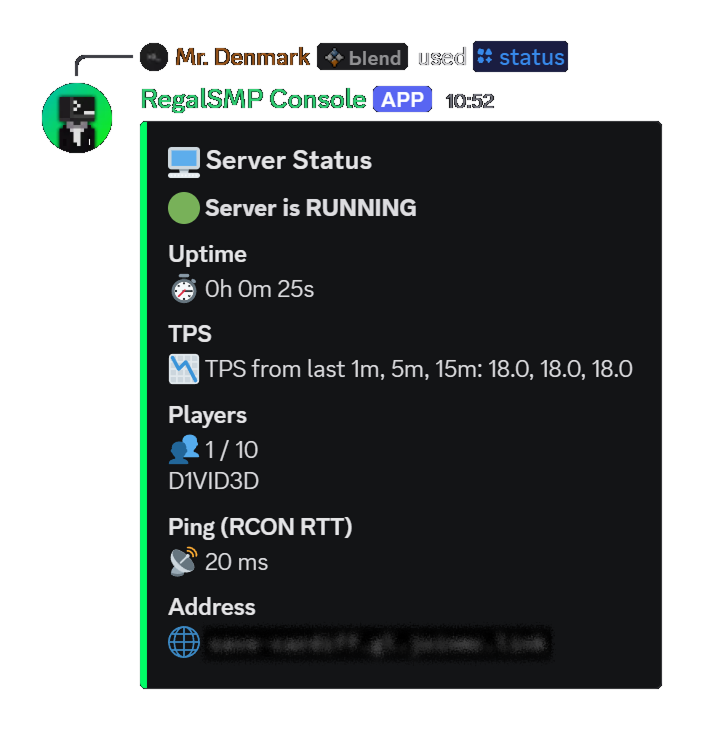
/status embed
⚡ /status

Full Status Embed

Shows systemd state, uptime, live TPS, current player count and names, and RCON round-trip latency, all in one embed.

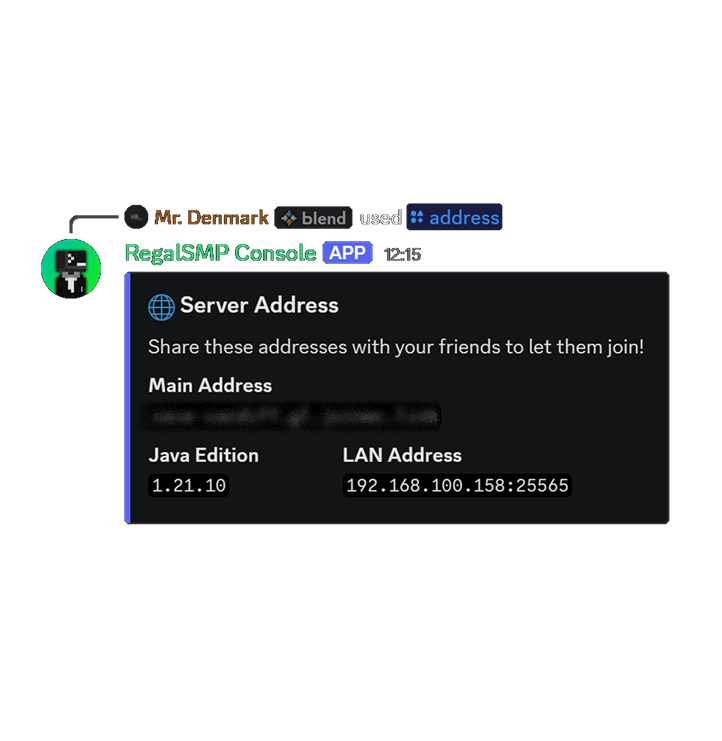
/address embed
🌐 /address

Server Address Info

Displays your public tunnel address, LAN address, and Java Edition version, all configured via your .env.

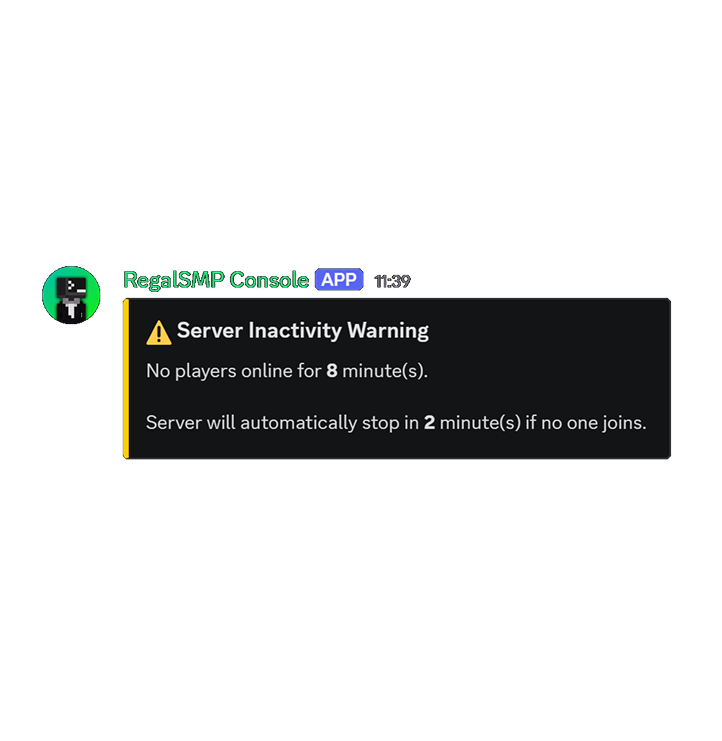
Auto-shutdown warning
💤 Auto-Shutdown

Inactivity Warning

Posted to your status channel when the server has been empty past the warning threshold, giving players a heads-up before the automatic stop.

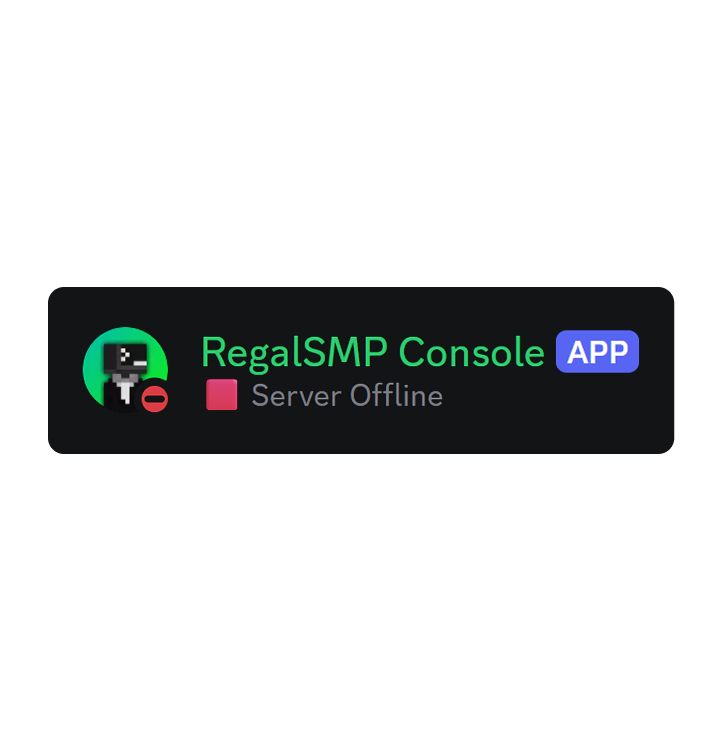
Bot presence
🤖 Presence

Live Bot Status

The bot's Discord status and activity reflect the server state in real time, visible from the member list or bot profile without running any command.

What's new

Pulled live from GitHub Releases.

Fetching changelog…
Loading previous releases…

Bot Presence States

Event-driven from the RCON manager. Your Discord member list tells the story at a glance.

🔴 Do Not Disturb 🟥 Server Offline
🟡 Idle 🟡 Server Starting...
🟢 Online 🟩 N player(s) online

Your Discord Control Panel

Every interaction with the server happens through clean slash commands, no need to SSH.

CommandDescription
/startStarts the Minecraft server via systemctl start
/stopGracefully stops the server, running save-all first
/restartSaves world data then restarts via systemctl restart
/statusFull status embed: systemd state, uptime, live TPS, player list, RCON ping
/addressShows server connection addresses, public, LAN, and Java edition version
/pingChecks the bot's Discord API latency
/checkupdateCompares current version against latest GitHub release and posts an embed if newer
And more planned to come! 🚀

Requirements

You’ll need to be comfy with Linux basics. If you know your way around systemd and Discord bots, you’re good.

🐧

Linux + systemd

Ubuntu, Debian, Arch, or any distro with systemd. The bot runs as its own service.

Node.js 18+

v22 recommended; used for development and testing and future migration plan to Typescript.

⛏️

Any Minecraft Server

Your actual Minecraft server, Duh.. (Paper is recommended, Required for TPS data.)

🤖

Discord Bot Token

Create an application in the Discord Developer Portal and enable Guild Members Intent.

🔑

sudo Access

A passwordless sudoers rule for the bot's user to run specific systemctl commands.

🌐

RCON Enabled

Enable RCON in your server.properties. Used for live stats and graceful save-before-stop.

Setup in 9 Steps

Follow along below, or hit the Docs for all the nitty-gritty details.

01

Clone the repo

Grab the code on your Linux box.

git clone https://github.com/d1vid3d/CraftDaemon
cd CraftDaemon
02

Install dependencies

Let npm do its thing.

npm install
03

Create a Discord bot application

Head to the Discord Developer Portal, make a new app, grab your bot token, and enable the Server Members Intent and Message Content Intent. Invite it with bot + applications.commands scopes.

04

Configure your environment

Copy the example env, fill in your bot token, IDs, RCON info, and whatever auto-shutdown settings you want.

cp config/.env.example config/.env
nano config/.env
05

Set up Minecraft as a systemd service

Write a .service unit for your Paper server. Make sure the service name matches MC_SERVICE in your .env.

06

Enable RCON on the Minecraft server

In server.properties, set enable-rcon=true, rcon.port=25575, and an rcon.password that matches your .env.

07

Grant sudoers permissions

Add a passwordless sudoers rule so the bot user can run systemctl start/stop/restart for your Minecraft service. (Don’t give it more than it needs!)

08

Configure RBAC

Edit config/permission-config.js to map your Discord role IDs and user IDs to command permissions like server.start and server.restart.

09

Register commands & start the bot

Register the slash commands, then install and enable the bot as a systemd service.

node src/register-commands.js
sudo systemctl enable --now craftdaemon
View GitHub Docs ↗ Full Docs →
🛠️

Early Project - Just One Dev

Heads up: CraftDaemon is still pretty new and changes fast. Stuff might break or change between releases, so always check the release notes before you upgrade.

This is a solo side project, so things might move slow and I might miss issues or PRs for a bit. Found a bug or want to pitch in? Open an issue on GitHub, contributions are very much welcome!

🎯

Barebones Today, Powerful Tomorrow

Right now, CraftDaemon does the essentials: start, stop, restart, and check status. It's intentionally minimal and lean. But that's just the foundation. Future releases will bring full admin controls straight from Discord, player moderation, and a whole lot more.

Getting there takes time and testing, so stick with us as we build it out. Your feedback and patience are super appreciated!